
Best Artist Portfolio Websites
A practical guide to choosing the best portfolio website platform for artists, comparing the features that matter for presenting work, attracting enquiries and building a professional online presence.
24 min read
The best artist portfolio website depends on what you need it to do. Squarespace and Wix are strong general-purpose choices; WordPress offers the greatest flexibility and ownership; and Shopify is strongest when prints, editions or products are the main business. Adobe Portfolio is attractive to existing Creative Cloud subscribers, while Cargo suits visually experimental and design-led portfolios.
Other platforms solve different problems. Behance supports discovery and commercial creative work. Saatchi Art is a marketplace rather than a fully owned artist website. Artwork Archive prioritises inventory and career administration. Vault Canvas connects a public portfolio to private artwork records, certificates, provenance and promotional tools. There is no universal winner: the right choice depends on your work, budget, selling model and career stage.
Last updated October 2026
Disclosure: This guide is published by Vault Canvas, which is included in the comparison below. Vault Canvas is currently a private-beta platform for artists. The comparisons are based on publicly available product information and are intended to explain which type of platform suits different needs. Vault Canvas receives no affiliate commission from the other platforms listed.
Best Artist Portfolio Websites at a Glance
Prices and features can change, so check each provider's current terms before subscribing. Features and indicative prices checked October 2026.
| Platform | Best for | Website or marketplace | Selling | Artwork archive | Indicative pricing |
|---|---|---|---|---|---|
| Squarespace | Artists wanting an attractive, straightforward website | General website builder | Built-in commerce on suitable plans | No specialist artwork archive | Paid subscription; confirm current regional pricing |
| Wix | Artists wanting flexible visual editing | General website builder | Available on suitable business and commerce plans | No specialist artwork archive | Free entry option; paid plans required for a professional domain and advanced features |
| WordPress | Artists wanting maximum flexibility and ownership | Hosted or self-hosted website system | Available through plugins such as WooCommerce | Requires plugins or a separate system | Free software or free hosted entry plan; hosting, domains and premium tools may cost extra |
| Shopify | Artists primarily selling prints, editions or products | E-commerce platform | Excellent integrated commerce | Product inventory rather than specialist artwork records | UK Basic plan currently starts from approximately £19 per month when billed annually; verify current terms |
| Adobe Portfolio | Existing Adobe Creative Cloud subscribers needing a simple portfolio | Portfolio website builder | No substantial native art-selling system | No | Included with eligible paid Creative Cloud subscriptions |
| Cargo | Design-led, experimental and visually distinctive portfolios | Creative website builder | Optional commerce add-on | No | Currently approximately US$14 per month when billed annually; verify current terms |
| Behance | Discovery, networking and commercial creative work | Creative community and portfolio platform | Freelance services and digital assets supported | No | Free core membership; optional Pro subscription |
| Saatchi Art | Artists seeking marketplace exposure and managed sales | Online art marketplace | Core purpose of the platform | No private professional archive | No conventional website subscription; its official information currently states a 40% commission on original artwork sales; verify current terms |
| Artwork Archive | Inventory management, contacts, locations, sales and career administration | Specialist artwork management platform with public profile | Sales tracking, invoicing and payment-related tools | Strong | Artist plans currently start at approximately US$9 per month when billed annually; verify current terms |
| Vault Canvas | Artists wanting a public portfolio connected to private artwork records, certificates, provenance and promotional tools | Specialist artist portfolio and archive platform | Enquiry-led presentation | Core feature | Free for invited beta artists; future pricing has not yet been finalised |
Which Artist Portfolio Website Is Best for You?
These are practical “best for” recommendations, not an absolute ranking:
- Best straightforward website builder: Squarespace.
- Best for visual editing flexibility: Wix.
- Best for ownership and customisation: WordPress.
- Best for selling prints and products: Shopify.
- Best for existing Adobe subscribers: Adobe Portfolio.
- Best for experimental visual design: Cargo.
- Best for creative-community discovery: Behance.
- Best marketplace option: Saatchi Art.
- Best established artwork-management system: Artwork Archive.
- Best integrated portfolio, archive and promotional workflow: Vault Canvas.
The Best Artist Portfolio Platforms Compared
Squarespace
Best for: artists wanting an attractive, straightforward website. Why artists choose it: Squarespace combines managed hosting, visual templates, custom-domain support and built-in tools for pages, forms and commerce. It can give a small or mid-sized portfolio a coherent presentation without requiring the artist to manage hosting or software updates. Principal limitation: it is a general website builder, so detailed artwork records, provenance and certificate workflows need a separate system. Pricing approach: it uses paid website subscriptions, with commerce available on suitable plans; regional prices and introductory offers vary. Judgement: a strong choice when presentation and low-maintenance editing matter more than specialist archive depth.
Wix
Best for: artists who value flexible visual editing. Why artists choose it: Wix offers a broad template range and a drag-and-drop editor that allows considerable control over page composition without coding. It supports custom domains, forms and commerce on suitable paid plans, while its free entry option lets an artist test the system first. Principal limitation: extensive design freedom can make consistency and mobile refinement more dependent on the artist's own decisions, and it does not provide a specialist artwork archive. Pricing approach: a free entry option is available, with paid plans needed for a professional domain and more advanced business features. Judgement: useful for artists who want direct visual control and are prepared to maintain a disciplined design.
WordPress
Best for: artists wanting maximum flexibility and ownership. Why artists choose it: WordPress can support a simple portfolio or a substantial artist website, with wide control over themes, individual artwork pages, publishing and search optimisation. WordPress.com is a hosted service with free and paid plans; self-hosted WordPress is free software installed with a separate hosting provider. Principal limitation: self-hosting brings responsibility for updates, security, backups and plugin compatibility, while some WordPress.com capabilities depend on plan level. Pricing approach: the software or hosted entry plan can be free, but hosting, domains, themes and premium plugins may cost extra; commerce is commonly added through WooCommerce. Judgement: the most adaptable route for artists who value control and can manage the extra complexity.
Shopify
Best for: artists primarily selling prints, editions or products. Why artists choose it: Shopify is built around commerce, with integrated checkout, product inventory, payments and tools for managing online sales. That makes it especially practical where repeatable products, variants and fulfilment are central to the business. Principal limitation: its product-led structure is not a specialist artwork archive, and a practice centred on unique originals sold through conversation may find a full shop more than it needs. Pricing approach: the UK Basic plan currently starts from approximately £19 per month when billed annually, subject to Shopify's current terms and payment costs. Judgement: a strong commercial system when selling is the primary task, rather than a complete record of an artistic practice.
Adobe Portfolio
Best for: existing Adobe Creative Cloud subscribers who need a simple portfolio. Why artists choose it: Adobe Portfolio provides a focused way to publish image-led project pages and can connect with Adobe's wider creative ecosystem. For an artist already paying for an eligible Creative Cloud plan, its inclusion can make it an economical way to establish a clean online presence. Principal limitation: it has no substantial native art-selling system or specialist artwork archive, and its long-term availability is tied to an eligible Adobe subscription. Pricing approach: Portfolio is included with eligible paid Creative Cloud subscriptions rather than sold as a conventional standalone artist platform. Judgement: a sensible, restrained portfolio layer for existing subscribers, especially when sales and record management happen elsewhere.
Cargo
Best for: design-led, experimental and visually distinctive portfolios. Why artists choose it: Cargo gives artists and designers considerable freedom to shape typography, image sequences and unconventional layouts. A single account can support multiple public sites, and commerce can be added when needed. Principal limitation: the design freedom asks more of the artist's visual judgement, while artwork inventory, provenance and career administration remain outside the platform. Pricing approach: Cargo currently lists one subscription at approximately US$14 per month when billed annually, with a separate commerce add-on for receiving payments. Judgement: particularly well suited to artists whose digital presentation is itself highly authored and who keep professional records elsewhere.
Behance
Best for: discovery, networking and commercial creative work. Why artists choose it: Behance places projects inside a large creative community where potential clients, collaborators and peers can encounter them. Profiles can support project presentation, freelance enquiries and digital-asset transactions, and an optional Pro subscription adds further tools. Principal limitation: the profile lives within Behance's shared design, audience and discovery system; it is not the same as an owned website on which the artist controls the complete visitor relationship. Pricing approach: core membership is free, with optional Pro features and transaction terms that should be checked before use. Judgement: valuable as a discovery channel or secondary portfolio, particularly for commercial creatives, but less complete as the permanent home of a fine-art practice.
Saatchi Art
Best for: artists seeking marketplace exposure and managed sales. Why artists choose it: Saatchi Art places work in front of buyers already browsing an online art marketplace and supports the sales process within that environment. This differs fundamentally from an owned artist website: the profile sits among many artists and the marketplace controls its layout, search and transaction framework. Principal limitation: artists give up some presentation control and pay commission when work sells; it is not a private professional archive. Pricing approach: there is no conventional website subscription, while Saatchi Art's official information currently states a 40% commission on original artwork sales. Judgement: potentially useful as an additional sales channel, but better understood as a marketplace presence than a replacement for an artist's own website.
Artwork Archive
Best for: inventory management, contacts, locations, sales and career administration. Why artists choose it: Artwork Archive is built around professional record-keeping, with artwork inventory, contact and location records, sales tracking, invoicing, reports and a public profile. It therefore addresses much more of the administrative practice than a general website builder. Principal limitation: its public profile is one feature within an established management system rather than a fully bespoke artist website, so artists seeking extensive visual authorship may still use another public site. Pricing approach: artist plans currently start at approximately US$9 per month when billed annually, with limits and features varying by tier. Judgement: an established choice when archive and business administration are the priority and public presentation can remain comparatively standardised.
Vault Canvas
Best for: artists wanting a public portfolio connected to private artwork records, certificates, provenance and promotional tools. Why artists choose it: Vault Canvas combines artwork cataloguing, Studio AI narrative and presentation tools, a live public portfolio and certificates of authenticity. Public presentation grows from the private artwork record, reducing the separation between maintaining an archive and presenting work online. Under its terms, artists retain all rights in the artwork, images and text they upload. Principal limitation: Vault Canvas is currently operating as a private beta, so access is selective and the product is still being refined. Pricing approach: access is currently free for invited beta artists; future pricing has not yet been finalised. Judgement: a relevant option for artists who want one connected portfolio, archive and promotional workflow and are comfortable joining a developing private-beta service.
What makes a good artist portfolio website?
A good artist portfolio website does a small number of things very well. It presents the work clearly, it tells a visitor who you are, and it gives them an obvious way to get in touch. Beyond that, the differences between platforms come down to how well they support the slower, less visible parts of an artist's practice: records, sales context, and growth over time.
The features that genuinely matter are:
- Clear presentation of artwork. Large, uncluttered images, with space around them and minimal interface. The work should not be competing with sidebars, social icons or auto-playing slideshows.
- Simple navigation. A visitor should be able to find your work, your statement and a way to contact you within a few seconds. Most artist sites do not need more than five or six top-level pages.
- Good image quality. Sharp uploads, sensible compression, and the ability to display work at a size that does it justice on a laptop, tablet or phone.
- Individual artwork details. Each significant piece should have its own page with title, medium, dimensions, year, and availability. A grid of images without context is a gallery wall in a vacuum.
- Artist biography and statement. Short, current and written in your own voice. Galleries and curators expect both.
- An enquiry route. A contact form, an email address, or both. Buyers and curators should not have to hunt.
- Mobile-friendly layout. Most first visits to an artist's site now happen on a phone. If the site is hard to read or navigate on mobile, the visitor leaves.
- SEO basics. Editable page titles, meta descriptions, clean URLs and alt text on images. Without these, the site is effectively invisible to search engines.
- Professional trust. Consistent typography, working links, a real domain name, no broken images, no Lorem ipsum.
- Room to grow. A site that is comfortable with twenty works should still be comfortable with two hundred.
Portfolio website or full artist website: what is the difference?
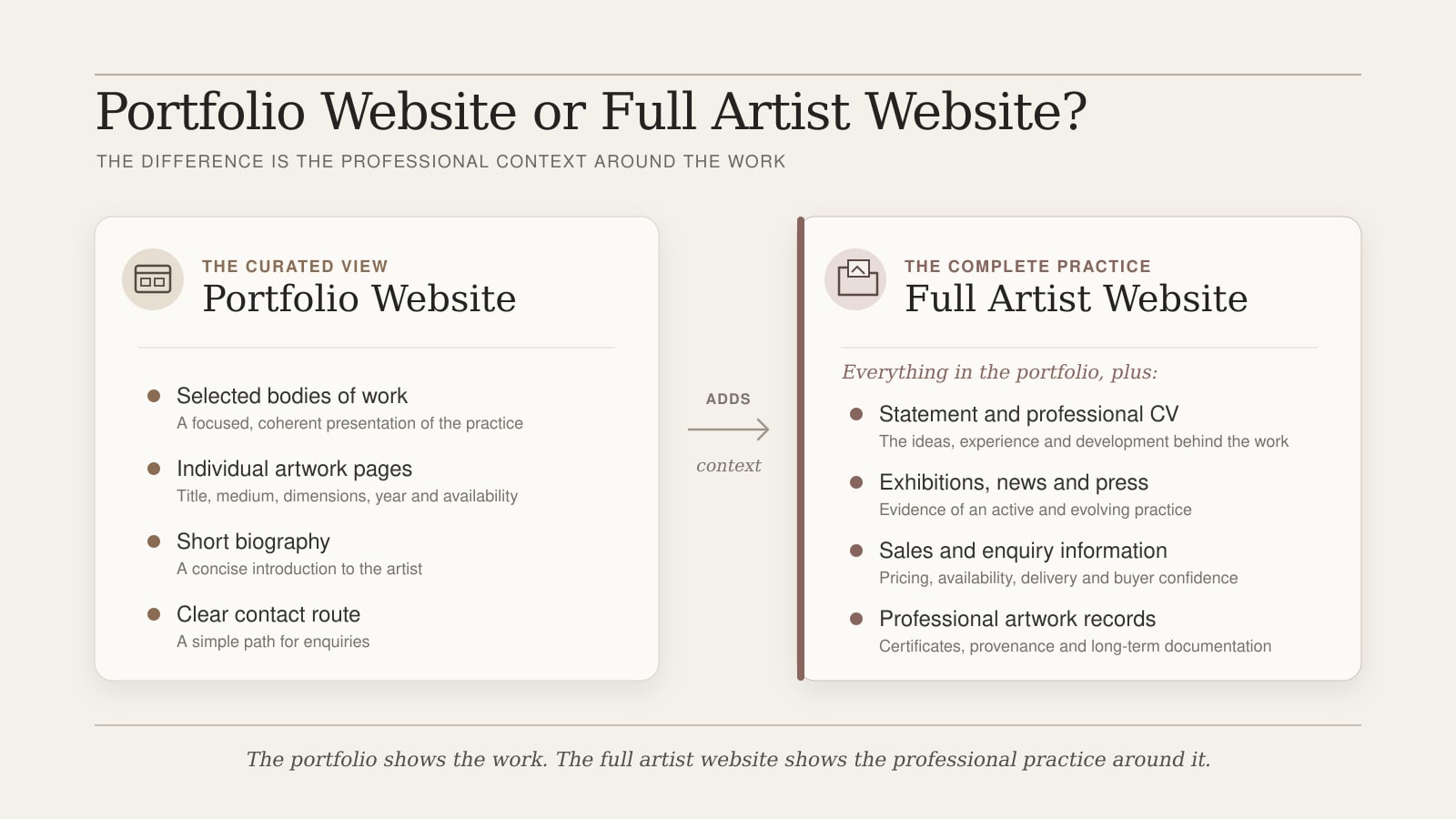
A portfolio website is, at its simplest, a curated selection of work shown well online. A full artist website is broader. It still presents work, but it also carries the supporting material that makes a practice legible to outsiders: a current biography, an artist statement, a CV with exhibitions and collections, news or a journal, enquiry and sales information, and — for serious practices — artwork records, certificates and provenance notes behind the scenes.
Many artists begin with a portfolio site and gradually find they need more. The work accumulates, exhibitions add up, collectors start asking for documentation, and the simple gallery of images stops being enough. At that point the portfolio becomes one part of a fuller artist website rather than the whole thing. If you are at that stage, the companion guide How to Build an Artist Website walks through the broader structure in detail.
The main types of artist portfolio websites
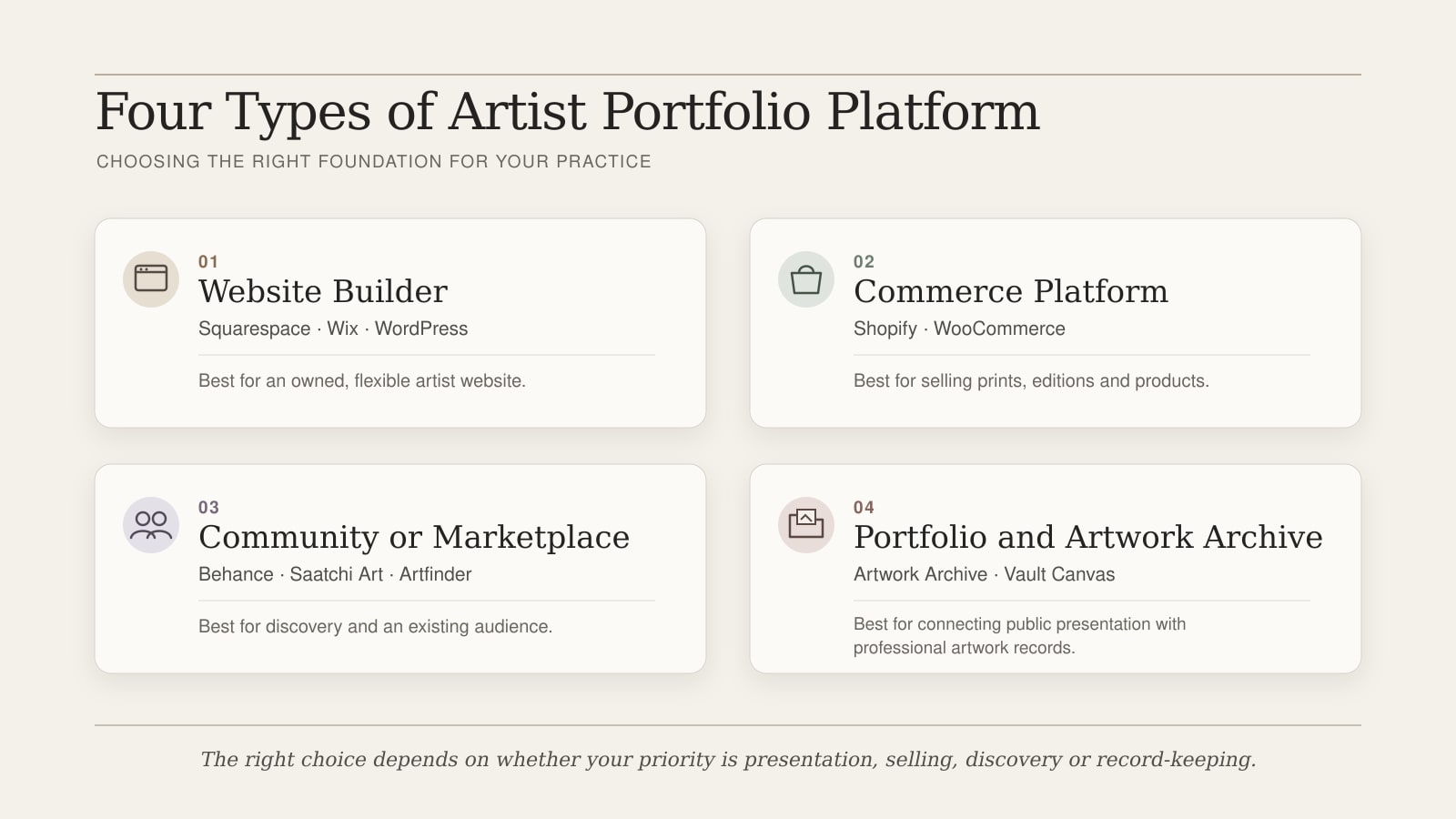
Before comparing individual platforms, it helps to understand the categories. Most artist portfolio websites fall into one of the following:
- General website builders — Squarespace, Wix, WordPress and similar.
- E-commerce platforms — Shopify, WooCommerce and equivalents.
- Portfolio and community platforms — Behance, Adobe Portfolio, ArtStation, Cargo.
- Online marketplaces and galleries — Saatchi Art, Artfinder, Etsy, Folksy.
- Specialist artist portfolio and archive systems — built around artwork records, inventory and provenance as well as public presentation.
- Custom-designed websites — bespoke builds for artists with specific requirements or established profiles.
Each category has a different centre of gravity. Choosing well usually means matching the category to what the practice actually needs, rather than starting with a brand name.
General website builders for artist portfolios
Squarespace, Wix and self-hosted WordPress are the most common starting points for artists who want a polished website without writing code.
Strengths. Wide choice of templates, reasonable image handling, straightforward editing, built-in hosting and SEO controls. Good for getting a professional-looking site online quickly. WordPress, especially with a well-built theme, offers the most long-term flexibility.
Limitations. Templates are designed for a wide market and rarely centre the artwork as fully as a specialist artist platform. SEO and image handling vary in quality. WordPress requires ongoing maintenance — plugin updates, security, backups — that many artists underestimate.
Best for. Artists who want a general-purpose artist website with a portfolio section and do not yet need deep artwork-record functionality.
E-commerce platforms for artists
Shopify, WooCommerce and similar platforms are built around selling. For artists making prints, editions or merchandise, they handle product variants, inventory, payments, shipping and tax cleanly. For more on the wider sales process, see How to Sell Artwork Online.
For an artist whose practice is mainly unique original work sold by enquiry, an e-commerce platform is often more than needed. The structure pushes you towards thinking of every artwork as a product, which can flatten how the work is presented. Supporting context — artist statement, exhibition history, provenance — has to be bolted on top.
If you do sell from your portfolio site, make sure the platform supports clear pricing, sensible shipping terms, and the ability to issue certificates of authenticity where appropriate. A working checkout is only a small part of why a collector decides to buy.
Portfolio and community platforms
Behance, Adobe Portfolio, ArtStation and Cargo are designed around creative-sector visibility — discovery, peer networking and a clean presentation layer linked to a community.
For graphic designers, illustrators and concept artists working in commercial pipelines, they can be excellent. For many fine artists — painters, sculptors, printmakers and photographers working in a gallery context — they are usually better treated as a secondary presence rather than the main professional home. The presentation is tilted towards illustration and commercial work, and the platforms are not set up to hold the long-term records, provenance and collector relationships that serious artistic practice produces. They can be a useful secondary presence, but most fine artists are better served by their own website as the central point.
Online marketplaces and galleries
Saatchi Art, Artfinder, Etsy and Folksy are marketplaces. They are useful for discovery and for reaching buyers who would not otherwise find you, but they are not the same as an artist portfolio website.
On a marketplace you are one of many artists in a shared shop. The platform controls the layout, the search ranking, the buyer relationship and, often, the data. Fees can be significant, and the buyer is usually a customer of the marketplace rather than a collector of your work. Marketplaces can introduce work to new audiences and generate sales — particularly early in a career — but a marketplace profile should support an artist's own website, not replace it.
Specialist artist portfolio and archive systems
A small group of platforms are built specifically for artists, with the public portfolio and the private artwork record treated as two sides of the same system. Each public artwork page corresponds to a full artwork record behind the scenes — inventory number, dimensions, materials, provenance, exhibition history, sales history, location history and, where appropriate, a certificate of authenticity.
This matters more than it first appears. As a practice grows, the artist who can answer "where is that painting now, what did it sell for, where has it been exhibited, and what does the certificate say?" within a few seconds is the artist galleries, collectors and estates want to work with. A pretty portfolio without records becomes a problem within ten years; a well-kept archive supports the work for decades.
Vault Canvas is one example of this kind of system, built for contemporary artists who want their public-facing portfolio to grow out of a properly maintained archive rather than the other way round. The deeper mechanics — archive databases, artwork management, certificates of authenticity and provenance — are covered in their own articles.
Free artist portfolio websites: when are they enough?
Free artist portfolio websites have a real place. For an emerging artist with a small body of work, a free Wix or WordPress.com entry plan can be enough to get the work online and start applying to open calls. Adobe Portfolio may be economical when it is already included with an eligible paid Creative Cloud subscription, but that is not the same as a standalone free service.
The limitations show up later: platform branding, a long generic URL, limits on pages or images, weaker SEO controls, and restrictions on selling. "Free to start" and "suitable as a long-term professional base" are not the same thing. A reasonable approach is to use a free site to test what you actually need, then move to a paid plan or a more capable platform once the practice is producing work and attracting enquiries with any regularity.
How We Assessed These Platforms
This comparison considers artwork presentation, individual artwork pages, mobile experience, SEO controls, custom-domain support, selling and enquiry tools, artwork-record functionality, export and ownership, ease of updating, cost, and suitability as a practice grows. It draws on publicly available product and pricing information rather than claiming that every platform was tested through a paid account. Platform features and terms change, so confirm the details most important to your practice before subscribing.
What to look for in an artist portfolio website builder
When comparing platforms, the surface-level question is "which looks nicest?" The more useful questions are practical:
- Image quality and layout control. Can you upload high-resolution images, control how they crop, and present work at a sensible size on every device?
- Individual artwork pages. Does each piece get its own page, or are you stuck with grids and lightboxes?
- SEO control. Can you edit page titles, meta descriptions, URLs and alt text on every page, including artwork pages?
- Easy updates. Adding a new work, updating availability, or changing a price should take minutes, not an afternoon.
- Mobile performance. Pages should load quickly on a phone, with images that are sharp without being heavy.
- Contact and enquiry tools. Forms, anti-spam, sensible delivery of messages to your inbox.
- Sales or payment options. Where relevant, the ability to take payment for prints, editions or originals without bolting on a clumsy third-party tool.
- Organisation by series, medium, availability or year. The platform should support how you think about your work, not force a single rigid structure.
- Export and ownership. Can you export your content and images cleanly if you ever need to move? You should never feel trapped.
- Cost and scalability. Pricing that is sensible now and remains sensible when you have a hundred works rather than ten.
A platform that does most of these well, even if it is less visually fashionable, will serve you better than a beautiful template that quietly fails at the basics.
What your online artist portfolio should include
Whichever platform you use, the contents of a strong online artist portfolio are broadly the same:
- A curated selection of work — not everything you have ever made, but a coherent body that represents the current direction of the practice.
- A clear series or collection structure, so a visitor can see how the work groups together.
- An individual page for each significant work, with title, medium, dimensions, year, and price or availability.
- A current artist biography.
- A current artist statement.
- A CV or exhibitions list, including selected exhibitions, awards, residencies and collections.
- A reliable contact or enquiry route.
- Sold or past work kept visible where appropriate, with availability marked clearly.
- Certificate or provenance notes for significant works, even if the full record stays private.
This article focuses on the platform decision itself; selection and sequencing are separate questions.
Portfolio websites for selling artwork
If you want your portfolio to do some of the selling, there are two broad approaches: direct sales via a checkout, or enquiry-led sales where buyers contact you and you handle the transaction yourself.
Direct sales can work particularly well for prints, editions and lower-priced originals, where the buyer is comfortable clicking "buy" without a conversation. For original artwork, our guide to how to sell artwork online covers the wider process of preparing the work, pricing, buyer trust, payment, provenance and delivery. Enquiry-led sales tend to work better for significant originals, commissioned work and higher-value pieces, where the buyer wants to ask about delivery, framing, viewing or provenance before committing.
Either way, the things that build buyer confidence are not new:
- Clear pricing, or a clear statement that prices are available on request.
- Honest, plain-English delivery information, including timescales and any limits.
- Sensible photography that shows the work as it really is, including scale shots where helpful.
- A certificate of authenticity for significant pieces.
- A visible artist behind the work — biography, statement, exhibitions.
Trust matters more than the checkout button.
Portfolio websites for galleries, curators and open calls
When a gallery or curator visits an artist's portfolio, they are usually trying to answer specific questions in a short time: is there a coherent body of work? Is the practice serious? Are the basics in place? Could I show this artist, write about this artist, or include this artist in a programme?
A portfolio that supports that quick assessment usually includes:
- A coherent, current body of work, presented as series rather than a single long grid.
- A clear CV or exhibitions list.
- A current artist statement, ideally one or two short paragraphs.
- High-quality images that load reliably.
- Artwork details — title, medium, dimensions, year — visible on each work.
- Press, reviews or downloadable information where relevant.
- An obvious, working contact route.
The companion guides on how to get your art into a gallery and open calls for artists go into what gatekeepers look for in more depth.
Connecting your portfolio website to artwork records
A portfolio website is the public face of a practice. Behind it sits, or should sit, a record of every significant work you have made. Each public artwork page should correspond to a private record that includes:
- The inventory number or unique reference for the work.
- Full artwork documentation — title, dimensions, materials, year, edition information where relevant.
- provenance — who has owned the work since it left the studio.
- Exhibition history.
- Sales history.
- Location history — where the work is now and where it has been.
- A certificate of authenticity record for significant pieces.
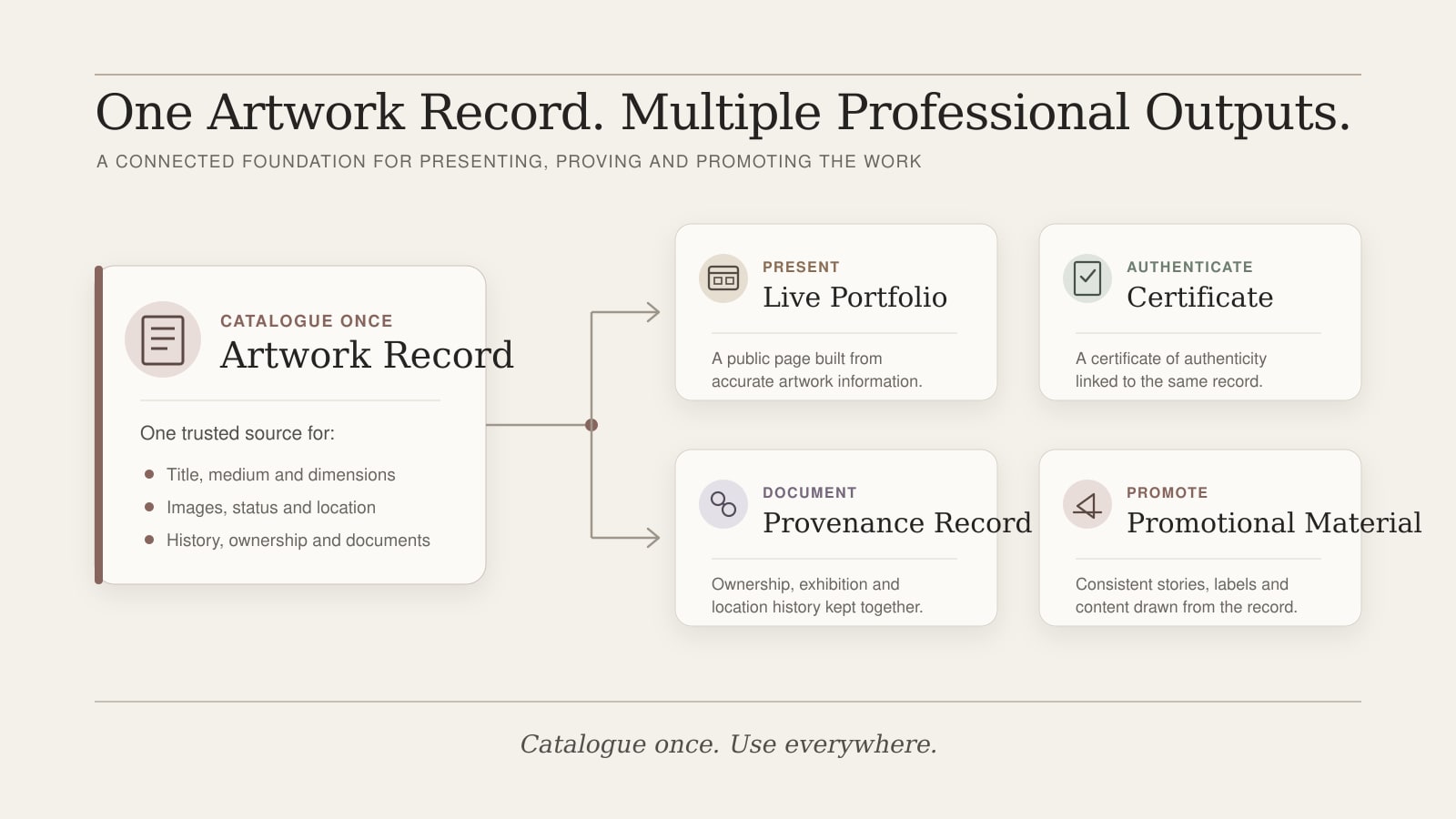
Early in a practice this can live in a spreadsheet. As the work accumulates, a dedicated archive database and an artwork management workflow become more useful, especially if you are working with galleries, collectors or institutions. The portfolio website is the shop window; the archive is the foundation it sits on.
Common mistakes when choosing a portfolio website
A few patterns turn up again and again when artists ask for help with their existing sites:
- Choosing only on template appearance. A template that photographs well in a marketing screenshot often fails on the practical questions above.
- Uploading everything. A portfolio is curated. Two hundred uneven works is worse than thirty strong ones.
- Choosing a marketplace instead of an owned website. Marketplaces are a sales channel, not a home.
- Ignoring individual artwork pages. A grid of thumbnails with no context is not a portfolio.
- Ignoring SEO. Default titles, missing meta descriptions and untyped URLs make the site harder to find than it needs to be.
- No clear enquiry route. Buyers and curators give up quickly if contact is hidden.
- Weak mobile experience. Phones are now the primary device for first visits; a site that ignores them loses most of its audience.
- No plan for records, certificates or provenance. The site looks fine for two years, then becomes a problem when collectors start asking for documentation.
- Choosing a system that cannot grow with the practice. Migration costs time and risks losing context that took years to build up.
Recommended approach for different types of artist
There is no universal best platform, but there are sensible starting points depending on where you are in your practice:
- Emerging artist with a small body of work. A simple, free or low-cost site that prioritises clear presentation and is easy to update. Plan to upgrade once the work and the enquiries justify it.
- Artist applying to open calls. A site with strong individual artwork pages, a current CV and statement, and clean URLs you can paste into application forms.
- Artist selling originals by enquiry. A site that presents work seriously, includes pricing or availability, and makes contact effortless. A checkout is optional.
- Artist selling prints or editions. A site or platform with a real e-commerce layer, sensible shipping rules, and the ability to issue certificates where appropriate.
- Artist with gallery interest. A site that reads as a professional practice — coherent series, exhibition history, statement, contactable artist — rather than a personal blog.
- Artist with a growing archive. A specialist artist portfolio and archive system, where the public portfolio is the visible layer of a properly maintained record.
- Artist who wants a simple, low-maintenance site. A small site on a stable platform, updated a few times a year, with the artwork records kept separately.
The right answer is rarely the most fashionable one. It is the one that fits the work you make and the way you want the practice to be looked after.
If you want to see what those choices look like in practice, Artist Portfolio Examples describes adaptable portfolio structures by stage and medium, and What Makes a Good Artist Website? sets out the quality criteria to assess your choice against.
Frequently Asked Questions
There is no single best portfolio website for every artist. The right choice depends on the work you make, how you want to sell or share it, and how much you need the site to support records and provenance. Most practising visual artists are best served either by a well-set-up general website builder or by a specialist artist portfolio and archive system, rather than by a marketplace or a community platform alone.
A curated selection of work organised by series, individual pages for each significant piece with title, medium, dimensions and year, a current artist biography and statement, a CV or exhibitions list, and an obvious enquiry route. Sales information, certificates and provenance notes can be added where relevant.
Yes. Several platforms offer free tiers that are workable for an emerging artist with a small body of work. The trade-offs are usually platform branding, a long generic URL, limits on pages or images, weaker SEO controls and restrictions on selling. A free site can be a sensible starting point, but plan from the beginning for how you will move to a paid plan or different platform when the practice grows.
No. Instagram is useful for visibility and for sharing work in progress, but it is not a portfolio. The platform controls what visitors see, the feed buries older work, image quality is compressed, and the audience belongs to Instagram rather than to you. Treat it as one channel that points back to your own website.
It depends on how you sell. Direct sales of prints and editions almost always benefit from clear prices. Original work is often sold by enquiry, in which case "price on request" with a contact route is acceptable. The least helpful option is to mark every work as "sold" or to leave availability unclear; that tends to discourage both collectors and curators.
There is no fixed number, but a tight, curated selection is almost always stronger than a comprehensive one. For many practising artists, twenty to forty carefully selected works is enough to give a clear picture, although the right number depends on the maturity of the practice and how the work is organised. Older work and sold work can sit in a separate archive section.
No. A marketplace profile is a presence on someone else's platform, with shared design, shared search and shared audience. An artist portfolio website is your own space, on your own domain, where you control the presentation and the contact with visitors. Marketplaces can usefully support a portfolio website, but they are not a substitute for one.
There is no single answer. General website builders such as Squarespace, Wix and WordPress all support artist portfolios well when set up carefully. E-commerce platforms suit artists who sell prints or editions in volume. Specialist artist portfolio and archive systems suit artists who want their public portfolio to grow from a properly maintained archive. The best choice is the one whose strengths match what your practice actually needs.
Where to Go Next
Platform choice is only half the question. The guide to creating a professional artist portfolio covers the editing and sequencing that decide whether the portfolio itself reads as a coherent body of work.
Already keeping artwork records separately from your website?
Vault Canvas is designed to connect the two. Catalogue an artwork once and use the same record for your public portfolio, certificates, provenance and promotional material.